Digital accessibility means creating a learning environment where every student feels included and capable. Being part of this work reminds me that even small efforts can make someone’s academic journey easier and more equitable. — Muqaddas S., Master of Public Health (MPH), Environmental Health
Campus Accessibility Wins
Winter Sprint Impact: Over winter break, faculty and staff submitted 25 Canvas courses and 20 department websites for the Winter Digital Accessibility Sprint. These updates support hundreds of students and address accessibility barriers at the start of the semester—reducing the need for last‑minute fixes and future remediation.
This progress reflects a growing campus effort to build accessibility into everyday work, one course and one site at a time.
The Countdown Is On!
April 24, 2026 Deadline
As April 24 approaches, we’re continuing campus‑wide work to meet the federal digital accessibility deadline. Making accessibility part of our regular workflow now will help us support all users and avoid rushed remediation later. Small updates made now can reduce last‑minute fixes and help ensure our content works for everyone.
Instructors: Sign Up for Course Accessibility Sprints by February 13
Faculty are invited to join a Spring Course Accessibility Sprint by February 13 to remediate course materials ahead of the April 24 federal accessibility deadline. Priority will be given to high‑enrollment courses and content shared across sections. Faculty spend about one hour reviewing UDOIT accessibility reports and removing duplicate files with COLRS, after which ODA and DART complete the accessibility work and return updated materials directly to the course. Additional course‑focused support will be available in the summer for fall and Gold Course preparation. Sign up by completing the Canvas Course Accessibility Intake Form.
Siteimprove Website Accessibility Reports
Website editors receive weekly Siteimprove accessibility reports from Web & Digital Strategy to help highlight areas that may need attention and to support steady progress toward our April accessibility goals. By clicking into the report and logging into Siteimprove with your UIS credentials, you can view your department’s overall accessibility score (with a target of 90% or higher) and see any PDFs associated with your site. Departments with lower scores will be included in the Spring Sprint so they can receive additional hands‑on support and make progress with help from our teams.
Digital Accessibility Pro-Tips
Add headings, update heading to match selection, or create your own style.
Screen readers rely on headings to navigate. Headings should be added by using Update to Match Selection in Microsoft Word. Here's how you get to this:
Home Ribbon > Styles Pane > Right Click on Heading 2 > Update Heading to Match Selection.
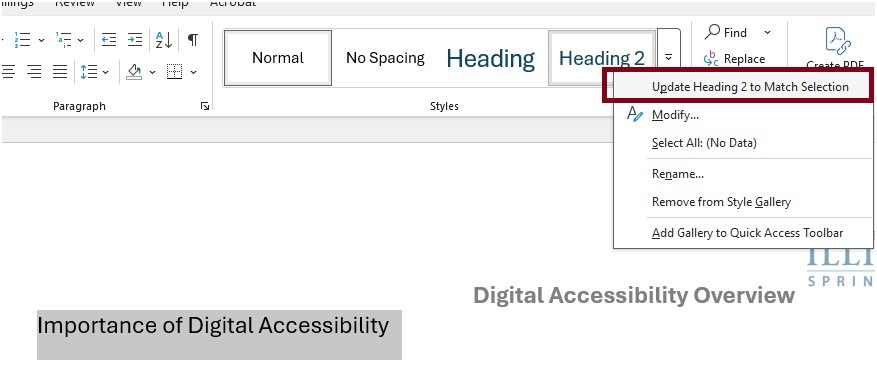
Please note: Built-in heading styles are formatted with different font types, styles, and color that will not match the original document. Therefore; make sure to use Update (Heading x ) to Match Selection.
Check color contrast before you publish.
Use the WebAIM Contrast Checker (or a similar tool) to confirm that the color contrast in your files meets accessibility guidelines. We recommend WebAIM in particular because its color dropper tool lets you click directly on the colors you’re testing and quickly see whether they meet standards for normal and large text.
Use descriptive links.
Links should describe their destination instead of relying on phrases like “click here.” Descriptive links such as “Read the syllabus (PDF)” make content easier to understand for screen‑reader users and anyone scanning a page.
One Easy Action
Pick one document you already use—a syllabus, a frequently shared PDF, or a department web page—and do a quick accessibility check:
- Add proper headings.
- Check color contrast.
- Use descriptive link text (avoid “click here”).
- Run the built‑in accessibility checker.
ODA Zoom Office Hours
For assistance with course and website accessibility, join the ODA Office Hours Zoom on Tuesdays and Fridays from 10:00-11:00 AM.
Save the Date: Upcoming ODA Workshops
We are also excited to share several upcoming ODA sessions designed to support you in fostering accessible teaching and workplace environments.